Tech catalog template with a neon-lit photo cover and dark pages
A seven-page catalog set with a neon light-streak photo cover and dark navy pages, for gadget, audio, smart home and gaming suppliers who want an after-hours look and a wholesale order form.
Free plan available — all templates are included on every plan. Already have an account? Open it in Templates.


All 7 pages
Cover, welcome letter, contents, how-to-order terms, a section divider, a wholesale order form and a back cover. Your product pages are added between them in the same fonts and colors.




About the Neon Tech template
This tech catalog template opens on a full-bleed photo of blue and amber light streaks, with Next Tech set in heavy Montserrat Extra Bold, the second word in cyan. Inside, dark navy pages carry white and cyan headings over short cyan rules, a cyan circle in one corner, a violet diamond in the other and a violet stripe along the foot, with Montserrat and Open Sans for text. The contents page lists Audio, Smart Home, Gaming, Wearables and New Releases.
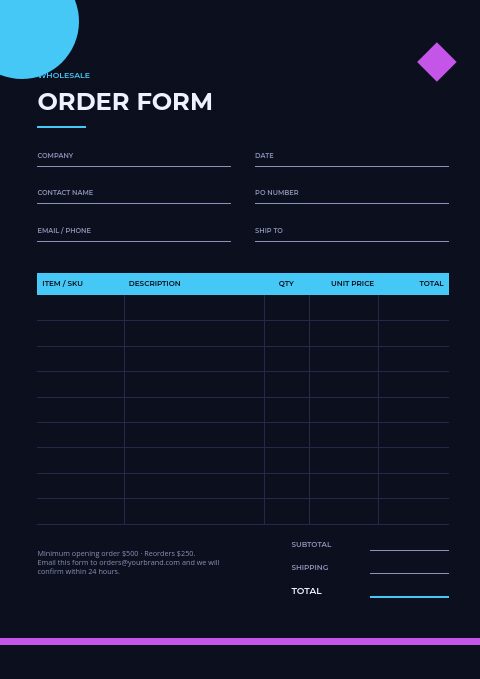
Behind the cover sit the pages a wholesale buyer expects: a welcome letter, contents, how-to-order terms with minimums and payment terms, a section divider, an order form with a cyan table header and a back page with contact details. Swap the cover image with Replace photo, add products from Shopify, a CSV or a product feed, and lay them out in grids. Export a PDF for a launch event, or send buyers the wholesale flipbook link to order online.
Best for
- Gadget and accessory wholesalers who want a dark, after-hours look
- Gaming and streaming gear suppliers with a new-releases section
- Smart home brands presenting a compact range to retailers
- Tech startups that need a quick catalog with an order form
- Launch events and pop-ups that need a short printed handout
Pages worth a closer look
Light-streak photo cover
A full-page photo of blue and amber light trails sets the tone, with a bold two-line title, the edition year and your web and email details on top. Replace the photo with your own product shot or a free stock image whenever you like.
Contents for audio, smart home and gaming
Five tech sections are listed with page numbers: Audio, Smart Home, Gaming, Wearables and New Releases. A cyan rule, a cyan corner circle and a violet diamond carry the cover's energy into a page that stays easy to read.
Dark order form with a cyan table
Dark navy carries on to the order page, where thin light lines collect the buyer's details and a cyan bar heads the item table. Totals and a minimums note close it, with the cyan corner circle and violet diamond still framing the page.
Tips for a dark, photo-led tech catalog
Pick a cover photo with dark space for the title
Light trails, glowing screens and backlit products photograph well against black, and they leave room for a title. Choose an image with a calm area where the words will sit, and check the resolution: an A4 cover printed at 300 DPI needs about 2480 × 3508 pixels, plus a little extra for bleed.
Keep small text readable on dark pages
Light text on a dark background looks thinner than it is, and in print fine strokes can fill in. Use regular or heavier weights for body text, avoid very small sizes for terms and prices, and keep strong contrast between text and background. Test one page on paper before printing the full run.
Give dark backgrounds a proper bleed
A full-color background must run past the trim line, or a thin white edge can appear after cutting. Export with 3 mm or 5 mm bleed and crop marks, and choose the CMYK Print professional option when a print shop produces the catalog. Check the proof for banding in large dark areas before approving the run.
Put new releases where buyers look first
Tech buyers open a catalog to see what is new. Place the New Releases section near the front or flag new models on product pages, and give each a launch date or availability note. Retailers plan shelf space around those dates, so make them easy to find.
Print a QR code for online ordering
Every flipbook link from EasyCatalog has its own QR code. Put it on the back page or beside the order form, so a buyer holding the printed catalog can open the online version and order through its built-in form instead of retyping SKUs into an email.
From product list to finished catalog
Start with this set
Open Neon Tech in EasyCatalog and recolor it with one of 12 palettes if you like.
Add your products
Import from Shopify in one click, or upload a CSV, connect WooCommerce or a product feed. Your products fill the product pages automatically.
Download or share
Export a print-ready PDF (up to 300 DPI, CMYK and bleed for print shops) or share an online flipbook with a built-in order form.
Questions about this template
Can I replace the neon cover photo with my own image?
Yes. Click the light-streak photo and use Replace photo to upload your own shot, pick a free stock image, or search your product photos by name. The dark navy pages and cyan accents can stay as they are, or you can switch the whole set to one of 12 palettes.
What does the Neon Tech set include besides the cover?
Six more pages follow the neon cover: a short founder's welcome, a contents page from Audio to New Releases, three-step ordering terms, a numbered collection divider, the order form and a back page with your contact details. Your products are laid out with the editor's grids, from four large tiles per page to twenty small ones or one-column line-sheet rows, in a catalog of up to 500 pages.
What sections should a tech product catalog have?
Open with new releases, then group products the way buyers shop, such as audio, smart home, gaming, wearables and accessories. Each section needs photos, SKUs, key specs and prices. Close with ordering terms, an order form and contact details, and add a compatibility note wherever a product depends on another device.
Do dark catalog pages print well?
They can, with some care. Ask the print shop which paper and black mix they recommend, keep hairline type off dark backgrounds, and let every full-color page run into the bleed. For drafts on an office printer, a lighter palette saves toner while the dark edition stays for print and the flipbook.



Start your Neon Tech catalog
Pick this template, add your products and download a print-ready PDF or share an online flipbook. Free plan available, no card needed.