Electronics order form template with a clean wholesale catalog
A seven-page wholesale set for electronics suppliers: cover, welcome letter, contents, how-to-order terms, divider, a printable order form and back page, drawn in electric blue on cool white.
Free plan available — all templates are included on every plan. Already have an account? Open it in Templates.


All 7 pages, in two versions
Cover, welcome letter, contents, how-to-order terms, a section divider, a wholesale order form and a back cover. Your product pages are added between them in the same fonts and colors.









About the Electronics template
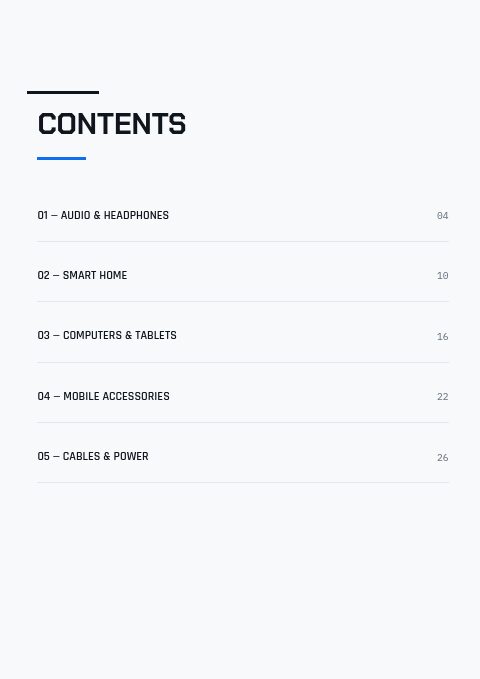
This electronics order form template comes inside a seven-page set drawn in a crisp vector style: electric blue and near-black on cool white, squared Chakra Petch headlines, Rajdhani labels and Inter body text. The cover reads Consumer Electronics, 2026 Edition, and the contents page lists Audio & Headphones, Smart Home, Computers & Tablets, Mobile Accessories and Cables & Power. A photo version adds a three-photo collage to the cover, a two-photo band to the divider and a dark full-bleed photo to the back page; 12 palettes recolor both.
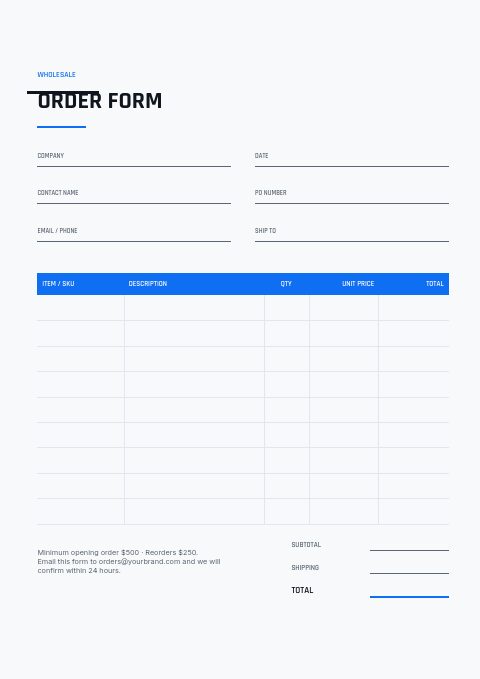
The order form carries the fields a store buyer fills in: company, contact, PO number and ship-to, then SKU, description, quantity, unit price and line totals above subtotal and shipping. The how-to-order page states opening and reorder minimums, lead time, claim window and Net 30 terms in words you can change. Products come from Shopify collections or a CSV and fill grids from 2×2 to 4×5 or one-column line-sheet rows. Print it, or share a flipbook where buyers order online.
Best for
- Phone case, charger and cable wholesalers that take orders by email
- Small gadget brands sending a first wholesale catalog to stores
- Smart home and audio suppliers handing out order sheets at trade shows
- Computer and tablet accessory resellers with five product categories
- Distributors who want a clean, photo-light look they can recolor
Pages worth a closer look
A printable wholesale order form
Header fields for company, date, contact name, PO number, email and ship-to sit above a blue-headed table for SKU, description, quantity, unit price and total. Subtotal, shipping and total lines close the page, beside a short note with your minimums and order email.
How-to-order terms in three panels
Three shaded panels explain how to send an order, the opening and reorder minimums with pricing, and delivery, claims and payment terms. A contact line sits underneath, so a buyer who reads only this page still knows how to order and whom to call.
Contents split into five electronics categories
Audio & Headphones, Smart Home, Computers & Tablets, Mobile Accessories and Cables & Power are already listed with page numbers. Rename them to match your range, or keep them as the backbone of a first catalog.
A typographic cover in electric blue
Consumer Electronics is set in squared, technical capitals, the second word in electric blue, over a 2026 Edition line with your web and email details at the foot. Choose the photo-collage version when you want product shots on the front.
How to set up an electronics wholesale order form
Lead each row with the SKU
Electronics buyers order by model number because many items differ only by wattage, length or color. Put the SKU first, then a description that names the variant, such as a 2 m braided cable or a 20,000 mAh power bank. Matching SKUs on product pages and on the form let you key orders quickly and avoid wrong shipments.
Write minimums in dollars and in units
State the opening order and reorder minimums in currency, and give pack quantities for small items such as cables, cases and screen protectors. If a buyer must order in multiples of 5 or 10, print that next to the item. In the online flipbook, the same rules can be enforced as minimum and multiple quantities.
Spell out dead-on-arrival claims
Faulty units are part of selling electronics, so tell buyers how many days they have to report a dead-on-arrival item, whether you swap it or issue a credit, and who pays return freight. The sample terms use a five-day claim window; change it to match the warranty your manufacturers give you.
Add compatibility notes to descriptions
Chargers, cables and cases come back when they do not fit the buyer's devices. Mention connector type, wattage, supported device sizes and any adapter needed, either in the description column or on the product page. One short compatibility line can save the reorder that follows a returned box.
Leave room for PO numbers and store addresses
Chains and multi-store retailers match deliveries against their purchase order number, and many ship to a different address than they bill. Keep both fields on the form, and ask for a phone number at the receiving store. Orders that arrive with these details are faster to confirm, pick and invoice.
From product list to finished catalog
Start with this set
Open Electronics in EasyCatalog, in the clean or the photo version, and recolor it with one of 12 palettes if you like.
Add your products
Import from Shopify in one click, or upload a CSV, connect WooCommerce or a product feed. Your products fill the product pages automatically.
Download or share
Export a print-ready PDF (up to 300 DPI, CMYK and bleed for print shops) or share an online flipbook with a built-in order form.
Questions about this template
Can stores order online as well as on the printed order form?
Yes. The order form page is made for print: it goes out with the PDF for buyers who prefer to write or email their orders. To take orders online, send the wholesale flipbook link and buyers order through its built-in order form, with your minimum order value and quantity rules applied. Flipbook orders reach you by email and also show up in the app.
Can I change the electric blue colors or add photos?
Pick one of 12 palettes to recolor all seven pages, or set your own colors and choose from 112 web fonts and 7 system fonts. The photo-collage version puts photos on the cover, divider and back page, and Replace photo swaps any picture for your own product shots or a free stock photo.
What should an electronics wholesale catalog include?
Open with a cover and a short welcome, then contents by category and clear ordering terms covering minimums, lead times, payment and claims. Product pages need a photo, SKU, key specs, wholesale price and suggested retail price, plus a barcode if stores scan deliveries. Finish with an order form and contact details so a buyer can act right away.
How many electronics products should fit on one catalog page?
It depends on how much a buyer needs to read. Small accessories such as cables and cases work in 3×3 or 4×4 grids with one spec line each. Headphones, speakers and tablets need room for specs and larger photos, so use 2×2 or one-column line-sheet rows. You can change the grid at any time in the editor.




Start your Electronics catalog
Pick this template, add your products and download a print-ready PDF or share an online flipbook. Free plan available, no card needed.