Fire safety catalog template in alarm red, with an order form
Seven bold pages in alarm red and flame orange, from cover to wholesale order form, with an alternate photo version of the cover, divider and back page. For fire safety dealers selling extinguishers, alarms and signage.
Free plan available — all templates are included on every plan. Already have an account? Open it in Templates.


All 7 pages, in two versions
Cover, welcome letter, contents, how-to-order terms, a section divider, a wholesale order form and a back cover. Your product pages are added between them in the same fonts and colors.





About the Fire Protection template
This fire safety catalog template sets tall League Gothic headlines over Roboto Condensed and Arimo text, in alarm red and flame orange. The cover, divider and back page are solid red with an orange corner circle, so they read like safety signage from a distance; the inner pages are warm white between red and orange rules. The seven pages are cover, welcome, contents, how to order, a divider, a wholesale order form and a back page, and an alternate version adds fire and extinguisher photos to three of them.
The sample contents follow a typical fire safety range: extinguishers, fire alarms, sprinkler systems, emergency lighting and exit signage. Import your products and the editor's grids lay them out between the divider and the order form, showing the fields you pick, such as SKU, price and a spec line in the description. Switch to one of 12 palettes if red is not your color, then export a print PDF or share an online flipbook that takes orders.
Best for
- Fire safety dealers selling extinguishers, alarms and signs to installers
- Emergency lighting and exit sign suppliers that need a short trade catalog
- Fire and security installers sending customers a product list with an order form
- Building supply distributors adding a fire safety section
- Trade-show handouts that buyers fill in and email back
Pages worth a closer look
Signage-style red cover
FIRE PROTECTION in stacked League Gothic capitals on solid red, with a 2026 edition line and your contact details. Replace the placeholder brand and it is ready to print or publish.
Contents for five fire safety categories
Extinguishers, fire alarms, sprinkler systems, emergency lighting and exit signage are listed with page numbers. Rename or reorder them to fit your range, and add lines if you carry more categories.
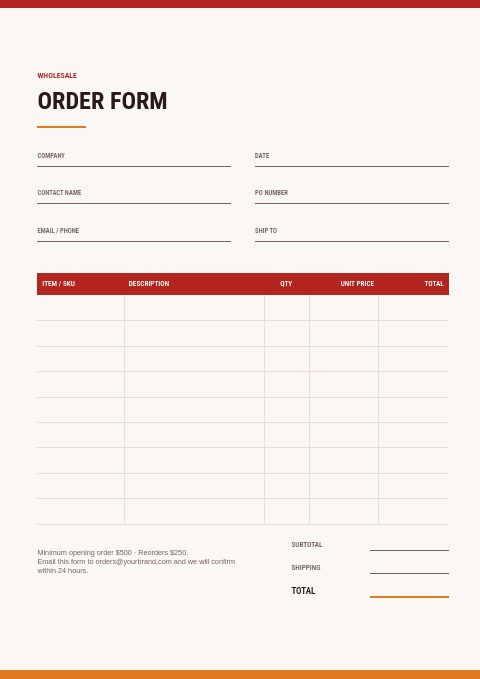
Wholesale order form
A ready form with company, contact, PO number and ship-to fields, item rows, subtotal and shipping. The minimum-order note and the email address at the bottom are yours to edit.
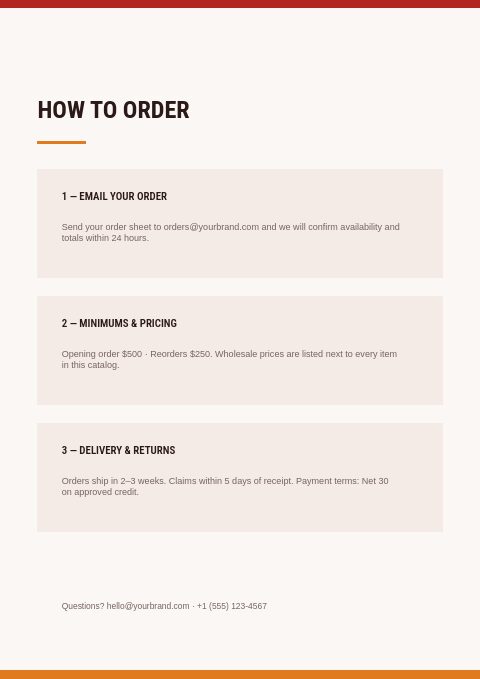
Ordering terms in three blocks
How to send an order, opening and reorder minimums, and delivery and returns, each in a few plain lines. Edit them once and they appear in both the printed PDF and the online flipbook.
What to list in a fire safety equipment catalog
Help buyers match extinguisher to room
Not every buyer knows which agent suits a kitchen, a server room or a workshop. Add a short table that matches fire classes to typical locations, or a note on each divider, so facility buyers order the right unit the first time.
Give emergency lighting its key specs
For emergency lights and exit signs, list battery type, run time, self-test function, mounting options and lamp type. These details decide whether a unit suits the building, so buyers look for them before they even check the price.
Keep spares next to the main unit
Detector bases, sprinkler wrenches, replacement batteries, mounting brackets and test equipment are easiest to sell right beside the devices they fit. Put them on the same page as the main product, or in a spares row at the end of each section.
Mark installer-only items
Sprinkler components and alarm panels are usually installed by licensed contractors, while extinguishers and signs are often bought by facilities directly. Labeling who each item is for helps you route trade pricing and avoids selling installer-only parts to the wrong buyer.
Describe signs the way buyers compare them
Exit and safety signs are compared by legend, viewing distance, material and whether they are photoluminescent or illuminated. List those four details and the sign page becomes an easy add-on to every installer's order and facility restock.
From product list to finished catalog
Start with this set
Open Fire Protection in EasyCatalog, in the clean or the photo version, and recolor it with one of 12 palettes if you like.
Add your products
Import from Shopify in one click, or upload a CSV, connect WooCommerce or a product feed. Your products fill the product pages automatically.
Download or share
Export a print-ready PDF (up to 300 DPI, CMYK and bleed for print shops) or share an online flipbook with a built-in order form.
Questions about this template
What pages does the Fire Protection classic set include?
Seven framing pages: cover, welcome letter, contents, how to order, a collection divider, a wholesale order form and a back page. A second version adds fire and extinguisher photos to the cover, divider and back page, and your fire safety products go between the pages on the editor's product grids, which you can style in the same red and orange.
Can I use this template for a retail fire safety shop?
Yes. Keep the order form and terms pages for business customers, or remove them and share the catalog as a retail flipbook that checks out at your Shopify store. The products and layout stay the same; only the pages and link type change.
What should a fire extinguisher listing include?
The fire classes it covers, its rating, agent, capacity, height and weight, discharge time, bracket type and whether it is rechargeable or disposable. Add the price per unit and per case, and note any shipping limits for pressurized units.
How many pages should a fire safety catalog have?
A focused dealer range often fits in 20 to 40 pages: the seven set pages plus product pages for each category. EasyCatalog handles up to 500 pages per catalog, so a large distributor can keep the full range in one catalog or publish one per category.
More templates like this




Start your Fire Protection catalog
Pick this template, add your products and download a print-ready PDF or share an online flipbook. Free plan available, no card needed.