Kitchen appliance catalog template in graphite indigo and steel
Made for appliance sellers who stock refrigeration, cooking and ovens, laundry, dishwashers and small appliances, this seven-page wholesale set has a technical look in graphite indigo, steel grays and bold Montserrat capitals.
Free plan available — all templates are included on every plan. Already have an account? Open it in Templates.


All 7 pages, in two versions
Cover, welcome letter, contents, how-to-order terms, a section divider, a wholesale order form and a back cover. Your product pages are added between them in the same fonts and colors.





About the Appliances template
This kitchen appliance catalog template is crisp and technical, like a stainless panel with a blue status light. Cool white pages, graphite ink and an indigo accent sit under heavy Montserrat Extra Bold titles, with Nunito Sans for the fine print. A thin indigo stripe runs along the top edge of every page and the foot of the cover. You get seven pages, from cover to order form, and a collage option that turns the cover, divider and back page into photo layouts.
Sections cover refrigeration, cooking and ovens, laundry, dishwashers and small appliances by default. Products arrive from Shopify, a WooCommerce store, a product feed or a CSV file, and each grid cell can hold a photo, model SKU, price, barcode and a variant table for finishes. Set three volume tiers and quantity rules in the wholesale flipbook, or print the catalog in landscape for a counter binder.
Best for
- Appliance wholesalers supplying kitchen and electrical stores
- Small appliance brands with many colors and models
- Kitchen studios presenting ovens, hobs and dishwashers
- Retailers producing a short promotional appliance catalog
- Distributors who print order forms for counter sales
Pages worth a closer look
Cool white cover with bold indigo capitals
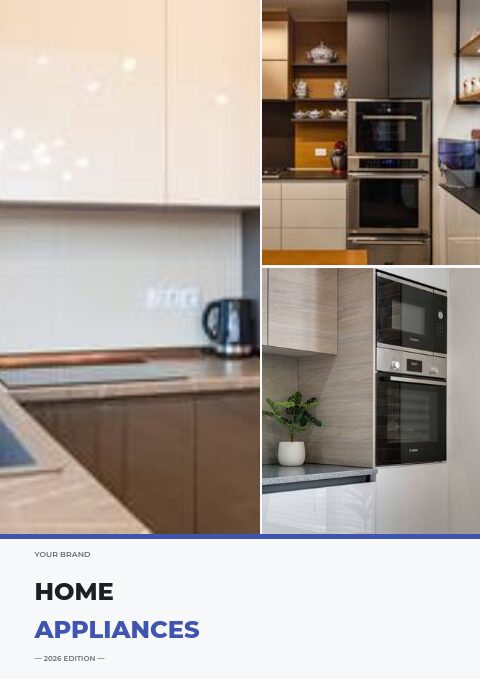
Home Appliances is set in heavy Montserrat capitals, HOME in graphite and APPLIANCES in indigo, with thin indigo rules at the top and foot, an edition line and contact details. The photo-collage version sets the same title below a three-photo kitchen collage for a retail feel.
Contents by appliance category
Refrigeration, cooking and ovens, laundry, dishwashers and small appliances are listed with page numbers. Buyers turn straight to the category they stock and skip the rest of the book.
Ordering terms
A short page answers what every new account asks: how to send an order, the minimum to meet, and the rules for delivery, claims and payment. Note liftgate and freight rules for large appliances here.
Wholesale order form
Built for counter and phone orders: a header for the buyer's company and PO, a table where each model number gets a line of its own with quantity and price, and your minimums printed in the footer.
How to present kitchen appliances in a wholesale catalog
Lead with the model number
Appliance buyers search and order by model number. Print it large on every product, keep it identical to your invoices and packing slips, and add the barcode so stores can scan stock on arrival. Consistent numbers cut mis-shipments.
Put key specs in the same order
Capacity, dimensions, energy use, power rating and noise should appear in the same order on every product. Buyers compare models across pages, and a fixed order makes the differences stand out without a separate table.
Show colors as variants
Small appliances often come in five or more colors. List them as variants in one table rather than as separate products, so the catalog stays compact and a buyer can order a mixed case with one line per color.
Place related items side by side
Kettles and toasters sell together, as do washer and dryer pairs. Put matching items next to each other and mention the pairing in the description, which helps a store plan a display and order both pieces at once.
From product list to finished catalog
Start with this set
Open Appliances in EasyCatalog, in the clean or the photo version, and recolor it with one of 12 palettes if you like.
Add your products
Import from Shopify in one click, or upload a CSV, connect WooCommerce or a product feed. Your products fill the product pages automatically.
Download or share
Export a print-ready PDF (up to 300 DPI, CMYK and bleed for print shops) or share an online flipbook with a built-in order form.
Questions about this template
Is this kitchen appliance template only for kitchens?
No. The sample contents also include laundry, and you can rename any section. Use it for refrigeration, cooking, dishwashers, washers and dryers or small countertop appliances; the grid pages accept any product type, including vacuums, fans and heaters if you carry them.
Can I print this appliance catalog in landscape?
Yes. Catalogs export as PDF in A4, Letter or A5, portrait or landscape, in five qualities up to 300 DPI. Choose the CMYK Print professional option and add bleed of 3 or 5 mm with crop marks when a commercial printer will produce it.
What information do appliance buyers look for first?
Model number, price, dimensions, capacity and energy use, followed by color options, warranty and delivery time. For built-in appliances, cut-out sizes and installation needs come first, because a model that does not fit the cabinet cannot be sold.
Should small and large appliances share one catalog?
They can, if you separate them clearly. Large appliances need specs, sizes and freight terms, while small appliances sell on color, features and price. Use dividers to split the two, and a denser grid for small appliances so they do not take up too many pages.
More templates like this




Start your Appliances catalog
Pick this template, add your products and download a print-ready PDF or share an online flipbook. Free plan available, no card needed.