Staff picks catalog template with notes from the shop floor
A 15-page retail catalog where your team recommends the products they would buy again, with short handwritten notes, sale prices and easy ways to shop. Written for a fictional bookshop and stationer, it suits any independent store.
Free plan available — all templates are included on every plan. Already have an account? Open it in Templates.


All 15 designed pages
Covers, promotion and product-story pages built for this campaign. Use the ones you need; your product pages are added in the same style.




Product pages that fill themselves
Import your products and they take this layout automatically — shown here with sample products. Switch the grid any time, from 2 × 2 to 4 × 5 or a one-column line sheet.

About the Staff Picks template
This staff picks catalog template feels like a favorite local shop. The front cover pairs a photo of an open book by a window with two yellow sticky notes quoting staff, and a red line in the handwriting font Kalam: chosen by the people who work here. DM Sans headings, cream pages, red numerals, a navy sale page and photos of pens, wax seals and old hardbacks keep the bookish mood going.
Shoppers trust a person more than a sign, so this catalog lets your team do the selling: every product on the favorites page carries a one-line note signed by the staff member who chose it. The sample copy for a fictional bookshop covers a one-week staff picks sale, free gift wrap, gift receipts and click and collect. On Shopify, publish the retail flipbook so shoppers can tap through to checkout; product pages show sale prices next to the original, and each can carry a QR code.
Best for
- Independent bookshops and stationers with a staff recommendation shelf
- Gift and paper shops running a one-week staff picks sale
- Shopify stores that want a shoppable catalog led by real people
- Holiday gift catalogs built from what the team actually uses
- Shops that print a take-home booklet for the counter
Pages worth a closer look
Sticky-note quotes on the cover
Two yellow notes with short staff quotes sit over a photo of an open book, next to a large title and a red handwritten line. Replace the quotes with your own team's words; they make the catalog feel personal before a shopper sees a price.
Featured pick with a QR code
One product fills the page with a photo, the name of the person who picked it, a short reason, its sale and original price, a red Shop now button and a yellow scan-to-shop box with a QR code for shoppers holding the printed copy.
Team favorites with signed notes
Six products appear with their prices and a red handwritten note from whoever chose them, such as “I'm on my ninth.” It reads like the shelf cards in a good bookshop and gives every product a reason to be bought.
Before-you-buy page for shoppers
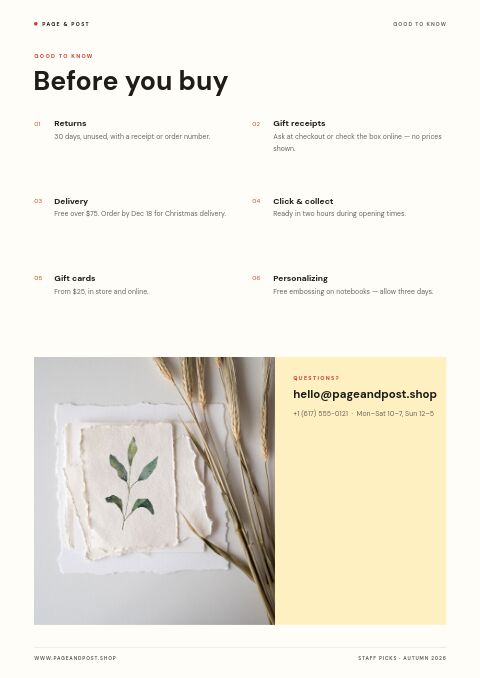
In place of trade terms, this retail page covers returns, gift receipts, delivery and the Christmas cut-off, click and collect, gift cards and personalizing. Answering these questions up front saves your team time at the counter and on email.
How to run a staff picks shelf and catalog that sells
Let staff write in their own voice
A staff pick works because it sounds like a person, not an ad. Ask each team member for one or two sentences on why they love the product, and keep their wording. Specific details, such as being on a ninth notebook, persuade more than adjectives do.
Mix price points on purpose
Include a few picks under $25 alongside the special pieces. Lower prices give hesitant shoppers an easy first purchase, and pricier items look like considered choices next to them. Gift buyers often shop by budget, so a spread of prices helps them decide quickly.
Match the catalog to your shelf cards
Shoppers who spot a pick in the catalog will look for it in the store. Use the same card color in both places, as the sample does with its yellow notes, and repeat the quote on the shelf card, so print, online and in-store tell one story.
Give a reason to buy this week
A short, dated offer such as a one-week discount on staff picks, or free gift wrap, turns browsing into buying. Keep the end date on the cover and the sale page, and from November add holiday delivery cut-offs so online shoppers order in time.
Refresh the picks regularly
Rotate picks every month or season so regular customers always find something new. Keep a few long-running favorites the team still stands behind, since returning shoppers like to see them, and put the month on the cover so everyone knows the list is current.
From product list to finished catalog
Pick this template
Open Staff Picks in EasyCatalog and choose the cover and the pages you want — every page is optional and editable.
Add your products
Import from Shopify in one click, or upload a CSV, connect WooCommerce or a product feed. Your products fill the product pages automatically.
Download or share
Export a print-ready PDF (up to 300 DPI, CMYK and bleed for print shops) or share an online flipbook with a built-in order form.
Questions about this template
Can shoppers buy straight from the Staff Picks catalog?
Yes, if you sell on Shopify. Publish it as a retail flipbook and shoppers go from a product in the catalog to checkout in your Shopify store. Product pages can show the sale price beside the original price and a QR code, and the flipbook link has its own QR code for posters, receipts and printed copies.
Is the Staff Picks template free to use?
Yes. The template costs nothing extra on any plan, the Free plan included, and Free needs no card. Linked to a Shopify store, Free covers two catalogs, a grid-editor one and a Basic-editor one; without Shopify it covers a single catalog of up to five pages, enough for a cover, the favorites page and a few picks. A small watermark appears on Free catalogs, and Basic, the first paid plan, is $19.99 a month.
How many staff picks should a store feature at once?
Ten to fifteen suits most independent stores: enough to cover different tastes and budgets, and few enough that each pick still feels chosen. Give every staff member one or two picks so several voices come through, and carry the most popular ones into the next edition.
What makes a staff recommendation card work?
Keep it short and specific: who picked it, one concrete reason and the price. A line like “Writes the first time, every time” does more than “a great pen.” Handwriting, or a handwriting font, signals a real person, and one consistent card color makes the picks easy to spot.
More templates like this


Start your Staff Picks catalog
Pick this template, add your products and download a print-ready PDF or share an online flipbook. Free plan available, no card needed.