Toy order form template in a bright, playful 7-page catalog set
A cheerful catalog frame for toy brands selling to shops, in sunny orange, teal and candy colors, with ordering terms and a printable order form already laid out.
Free plan available — all templates are included on every plan. Already have an account? Open it in Templates.


All 7 pages, in two versions
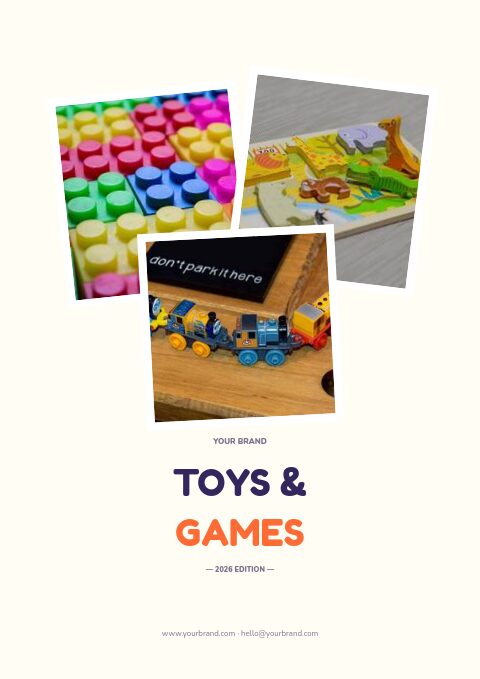
Cover, welcome letter, contents, how-to-order terms, a section divider, a wholesale order form and a back cover. Your product pages are added between them in the same fonts and colors.






About the Toys & Games template
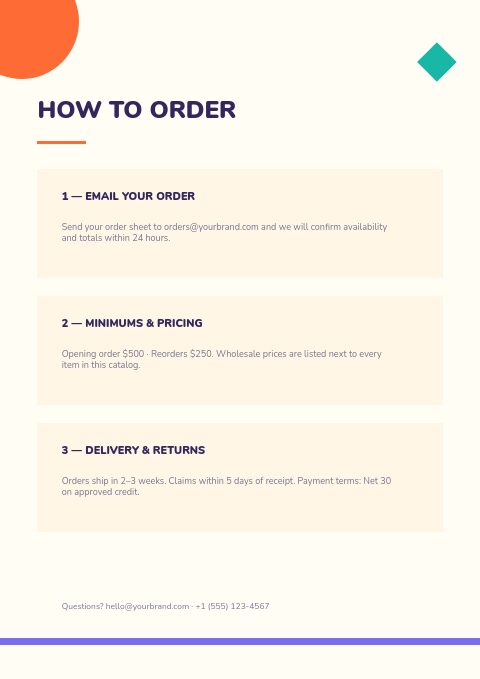
This toy order form template comes with six matching catalog pages in a bold, geometric style. An orange quarter-circle and a teal diamond sit in the top corners of each cream page, a violet stripe runs along the foot, and Fredoka One headings in orange and indigo pair with Nunito Black and Nunito. The contents list Building Sets, Plush & Dolls, Board Games, Outdoor Play, and Puzzles & Learning. A photo version stacks three toy snapshots on the cover, runs two across the top of the divider and ends on a full-bleed photo of toy bricks.
Toy makers and distributors can turn a product list into a trade catalog in one sitting: import products and they fill grid pages placed between the divider and the order form. Shops get your terms, minimums and a form they can print and email back, or you share a wholesale flipbook with the order form built in. Recolor the set with 12 palettes and export a print-ready PDF for buying appointments.
Best for
- Toy brands that need a simple wholesale catalog with an order form
- Distributors of building sets, plush, games and outdoor play
- Small toy makers getting ready for their first trade show
- Educational toy sellers who want a clean, colorful set
- Toy importers sending seasonal ranges to independent shops
Pages worth a closer look
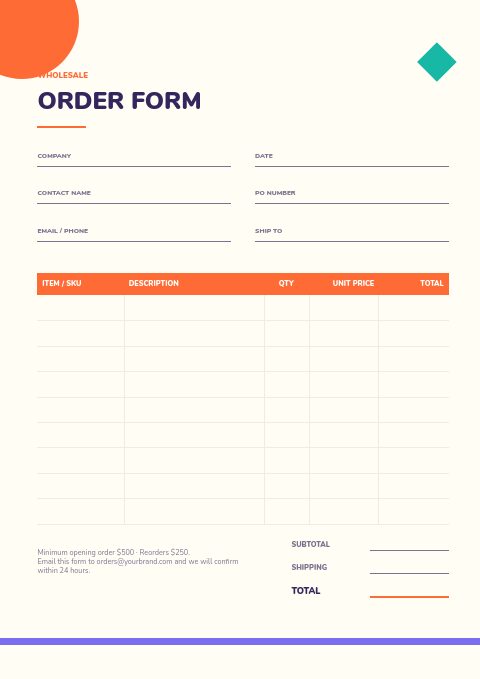
Printable order form for toy-shop buyers
Toy shops fill in their store details and PO number, then list each item by SKU with quantity and unit price; line totals, subtotal, shipping and total sit at the foot. Share a wholesale flipbook and buyers can order online through its built-in form instead; those orders reach you by email and in the app.
Contents for five toy categories
Building Sets, Plush & Dolls, Board Games, Outdoor Play, and Puzzles & Learning are already numbered with page references. Keep the structure, or rename the sections to match your own range and price list.
Bold Toys & Games cover
A stacked title in Fredoka One, playful geometric shapes and an edition line. Change the title, add your logo and web address, or pick the photo cover, which stacks three toy snapshots above the title, and swap in your own product shots.
How to build a toy wholesale catalog shops will order from
Group products the way shops merchandise
Toy shops lay out their floor by category and age: building, plush, games, outdoor, learning. Mirror that order in your catalog so a buyer can plan a whole section of the store from one chapter and quickly spot gaps in their range.
Make every SKU easy to find
Buyers write orders straight from the catalog page, so print a short, unique SKU beside each photo and use the same code on the order form and invoices. Add barcodes if shops scan deliveries at receiving; EasyCatalog can print barcode and QR code fields.
Show packaging and display options
Shops care how a toy looks on the shelf. Mention box size, whether it hangs on a peg, and any counter display that comes with a case. Display-ready products are easier for a busy shop to set up and face out.
Publish minimums and lead times up front
State the opening order, the reorder minimum, case quantities and how long orders take to ship. Toy buyers juggle dozens of vendors before the holidays, and clear terms on the page save them a phone call or an email chain.
From product list to finished catalog
Start with this set
Open Toys & Games in EasyCatalog, in the clean or the photo version, and recolor it with one of 12 palettes if you like.
Add your products
Import from Shopify in one click, or upload a CSV, connect WooCommerce or a product feed. Your products fill the product pages automatically.
Download or share
Export a print-ready PDF (up to 300 DPI, CMYK and bleed for print shops) or share an online flipbook with a built-in order form.
Questions about this template
What is included in the Toys & Games catalog set?
You get seven pages ready for toy-shop buyers: a bold cover, a welcome letter, contents for five toy categories, ordering terms, a collection divider, the wholesale order form and a back page. Want photos up front? The photo edition stacks three snapshots on the cover, runs two across the top of the divider and fills the back page with one photo. Product pages are added between them from the editor's grids, in the same fonts and colors.
Can I use this toy catalog for retail customers too?
Yes. Every page is editable, so you can remove the order form and trade terms, show retail prices and share a showcase flipbook. If you sell on Shopify, a retail flipbook can send shoppers to your Shopify checkout. A wholesale edition and a retail edition can sit side by side.
What information should a toy order form include?
Store name, buyer contact, email, ship-to address and PO number, then for each line the SKU, product name, case pack, quantity, unit price and total. Add the subtotal, shipping terms, your minimums and where to send the form, plus space for a requested delivery date before the holidays.
How far ahead should toy brands send their catalog?
Send the main catalog four to six months before the season it covers. Holiday ranges usually reach buyers in spring, before the summer shows, with a smaller reorder catalog in early fall. A flipbook link lets you update stock and prices between printed editions.




Start your Toys & Games catalog
Pick this template, add your products and download a print-ready PDF or share an online flipbook. Free plan available, no card needed.