Food and beverage order form template with a matching 7-page catalog
A clean seven-page catalog set for food and drink brands that sell to shops: tomato red on warm cream, Playfair Display headings and a wholesale order form, plus a photo version with a collage cover and a full-photo back page.
Free plan available — all templates are included on every plan. Already have an account? Open it in Templates.
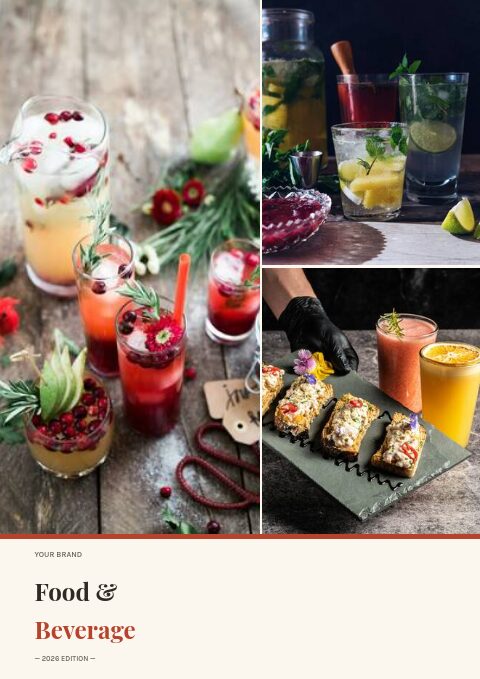


All 7 pages, in two versions
Cover, welcome letter, contents, how-to-order terms, a section divider, a wholesale order form and a back cover. Your product pages are added between them in the same fonts and colors.


About the Food & Beverage template
This food and beverage order form template is part of a seven-page classic set drawn in tomato red on warm cream. Playfair Display headlines sit over Karla and Lora text, and soft beige circles crop in from the page edges. The contents page is pre-filled for pantry staples, snacks and confection, beverages, sauces and condiments, and fresh and frozen. A photo version adds a drinks collage to the cover, a photo band to the divider and a full-bleed photo to the back page, and twelve palettes recolor the set.
The set gives a food or drink producer the framing pages a buyer expects, while your products fill the pages in between. Build those from the editor's grids, from 2×2 cards with photos and descriptions to dense line-sheet rows with SKU and price. Products come in from Shopify, WooCommerce, a CSV file or a product feed. The order form prints with the PDF for buyers who still email a scanned sheet, and the wholesale flipbook adds an online version with minimums.
Best for
- Small-batch sauce, snack and beverage brands selling to independent grocers
- Food producers who want a simple wholesale catalog with a printable order form
- Drinks makers listing flavors, pack sizes and case counts for stockists
- Farm shops and delis sending a seasonal order sheet to regular accounts
- Trade fair handouts that need a cover, terms and an order form in one set
Pages worth a closer look
Wholesale order form ready to print
Fields for company, date, contact, PO number, email or phone and ship-to sit above an item table with SKU, description, quantity, unit price and line total, then subtotal and shipping. A footer line states your opening and reorder minimums.
Contents pre-set for a food and drink range
Five numbered sections with page numbers: pantry staples, snacks and confection, beverages, sauces and condiments, and fresh and frozen. Rename them to match your own categories while the layout keeps its clean numbered rhythm.
How-to-order page in three steps
Email your order, minimums and pricing, delivery and returns: the three topics most trade buyers ask about first. Edit the response time, minimums and delivery terms to your own and you answer the usual questions before anyone asks.
Cover in tomato red and warm cream
A typographic cover with your brand name, a large Food & Beverage title in Playfair Display, the edition year and your web and email details. Switch to the photo-collage cover when you have strong product shots to show.
What a food and beverage order form should ask for
State the unit for every quantity
Buyers misread quantities more often than prices. Say whether a line is sold by the jar, the case of 12 or the tray, and put the pack size in the description column. A grocer who orders six expecting cases and receives six jars will hesitate to reorder, so make the unit impossible to miss.
Put minimums and delivery days on the form itself
The order form often travels without the rest of the catalog, forwarded to a buyer or printed for the stockroom. Repeat your opening minimum, reorder minimum, delivery days and payment terms in its footer so a single page still answers the questions that hold up an order.
Separate fresh and frozen lines
Chilled and frozen products ship differently and often on different days. Keep them in their own section of the catalog and of the form, note the delivery method, and tell buyers whether ambient and chilled lines can share one order. It saves a round of emails on every first order.
Leave room for a PO number and receiving notes
Grocery chains and larger cafes often cannot process an invoice without their purchase order number, and many accept deliveries only at set hours. A PO field and a short line for receiving instructions, such as a back-door drop or a dock window, prevent missed deliveries and stalled payments.
Date your prices
Ingredient and freight costs move during the year, so print the date your trade prices are valid until and how much notice you give before a change. Buyers plan promotions months ahead, and a clear validity date protects both sides when a cost increase lands mid-season.
From product list to finished catalog
Start with this set
Open Food & Beverage in EasyCatalog, in the clean or the photo version, and recolor it with one of 12 palettes if you like.
Add your products
Import from Shopify in one click, or upload a CSV, connect WooCommerce or a product feed. Your products fill the product pages automatically.
Download or share
Export a print-ready PDF (up to 300 DPI, CMYK and bleed for print shops) or share an online flipbook with a built-in order form.
Questions about this template
Does the Food & Beverage classic set include a printable order form?
Yes. The sixth page is a wholesale order form with buyer details, a PO number, a ship-to field and an item table with SKU, description, quantity, unit price and totals. All of its text is editable. It prints as part of the PDF, and if you share a wholesale flipbook, buyers can also order through its built-in online form.
What is the difference between the vector and photo-collage versions?
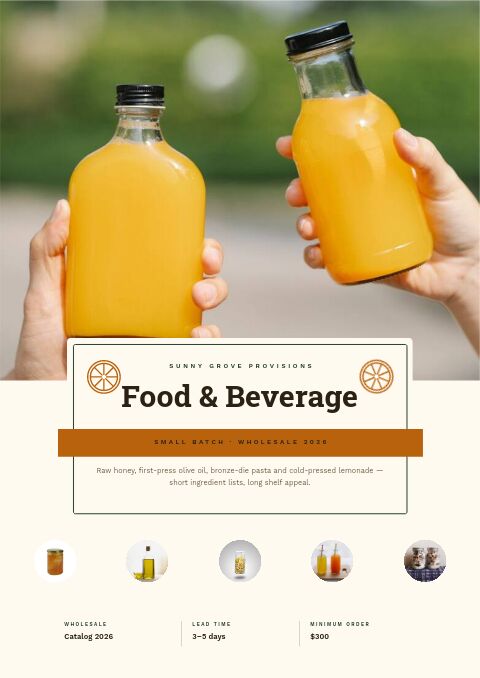
The welcome, contents, terms and order form pages are identical in both. The vector version keeps the cover, divider and back page in flat color with soft circle shapes, a clean look that prints well, while the photo version puts a collage on the cover, a band of photos atop the divider and one full-bleed photo behind the back page. Replace any template photo with your own shots or free stock photos, and recolor either version with one of twelve palettes.
How should a food and drink catalog be organized?
Most buyers shop by category and by storage, so group lines the way a store shelves them: pantry, snacks, beverages, sauces, then chilled and frozen. Open each section with a divider that explains the range, and put new or seasonal lines first within it. Keep each product card to the details a buyer compares: pack size, price and shelf life.
What opening minimum should a small food brand set for wholesale?
There is no single rule, but an opening minimum should cover your picking, packing and freight with margin to spare, and the reorder minimum is usually lower to keep accounts coming back. Test the figure against your typical case price. In an EasyCatalog wholesale flipbook you can set a minimum order value on the built-in order form.
More templates like this




Start your Food & Beverage catalog
Pick this template, add your products and download a print-ready PDF or share an online flipbook. Free plan available, no card needed.