Restaurant menu template with a chef’s special and set lunch
A 15-page menu for a seasonal bistro and wine bar, from covers and contents to the chef’s special, house favorites and allergy notes. Print it for the table or share it as a flipbook with a QR code.
Free plan available — all templates are included on every plan. Already have an account? Open it in Templates.


All 15 designed pages
Covers, promotion and product-story pages built for this campaign. Use the ones you need; your product pages are added in the same style.


Product pages that fill themselves
Import your products and they take this layout automatically — shown here with sample products. Switch the grid any time, from 2 × 2 to 4 × 5 or a one-column line sheet.

About the Restaurant Menu template
This restaurant menu template has the feel of a printed bistro card: cream pages, bottle green and paprika red, an olive motif, Playfair Display headlines, Lato for dishes and prices, and Allura script for flourishes. Three covers suit different uses, from a classic front with opening hours to an à la carte band cover and an “Eat slow.” poster. A contents page lists five courses with their starting prices.
Use it as a dine-in menu, a takeout menu or a QR code menu. Add dishes as products by hand or from a CSV file and they fill cream menu pages that match the covers, each with photo, name, description and price; dietary tags can show too. Print A4, Letter or A5 PDFs for tables and the window, and share a showcase flipbook whose link comes with a QR code for table tents, receipts and your website.
Best for
- Bistros and wine bars with a seasonal à la carte menu
- Cafés that want a printed menu and a QR code version
- Restaurants adding a set lunch or chef’s special page
- Caterers and private dining rooms presenting event menus
- Farm-to-table kitchens whose menu changes with the market
Pages worth a closer look
Contents page with starting prices
The contents page lists five courses, from starters to wine and drinks, each with a “from” price and a line of example dishes. Guests see the shape of the meal at a glance, and the page works as a one-page menu on its own.
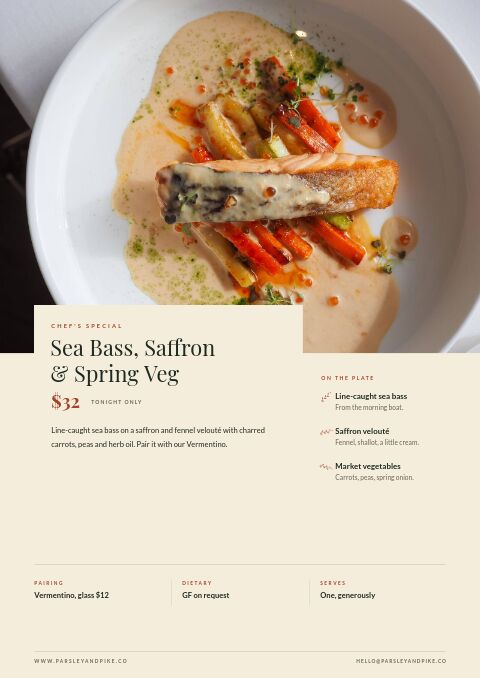
Chef’s special with pairing and dietary notes
A full page for tonight’s special shows the dish, its price, what is on the plate, a wine pairing by the glass and a gluten-free note. Swap in a weekly special, a tasting course or a seasonal dish while keeping the layout.
House favorites with dietary marks
Under the House Favorites heading, four signature dishes appear with round photos, short ingredient lines, prices and a vegetarian mark. The page steers first-time guests toward the plates the kitchen is proudest of.
Set lunch offer
A bold page sells a three-course set lunch at a fixed price, with the days, hours and a two-course option underneath. Edit it into a happy hour, a weekend brunch deal or a holiday set menu.
Allergy and house notes
The “Good to know” page covers allergies, dietary marks for vegetarian and gluten-free dishes, a service charge for large tables, children’s portions and private dining. It answers common questions before they reach the server.
How to make a restaurant menu that is easy to order from
Order sections the way guests eat
Run the menu in the order of a meal: starters, salads, mains, desserts, then wine and drinks. Give each course a clear heading or divider, and add a contents page with starting prices once the menu runs past a few pages.
Write descriptions that name the ingredients
Name the source and the method: line-caught fish, farm eggs, wood-fired, slow-braised. Three or four ingredients per dish is enough, and plain words beat adjectives. Many higher-end menus also drop the currency sign so guests focus on the food rather than the price.
Mark allergens and dietary options clearly
Use a short key, such as V for vegetarian and GF for gluten-free, and explain it once. Ask guests to tell the server about allergies, and keep a full allergen chart behind the bar, since many regions require allergen information on request.
Put signature dishes where eyes land
Guests tend to notice the first and last items in a section and anything boxed or set apart. Place a profitable signature dish there, give the chef’s special its own page, and avoid lining prices up in a column, which invites comparing on price alone.
Explain takeout and delivery in four steps
If you offer takeout, delivery or gift cards, explain how on one page: QR ordering, collection times, delivery radius and minimum spend. Keep it to four short steps, and repeat the phone number and web address on the back cover so the menu works on its own.
From product list to finished catalog
Pick this template
Open Restaurant Menu in EasyCatalog and choose the cover and the pages you want — every page is optional and editable.
Add your products
Import from Shopify in one click, or upload a CSV, connect WooCommerce or a product feed. Your products fill the product pages automatically.
Download or share
Export a print-ready PDF (up to 300 DPI, CMYK and bleed for print shops) or share an online flipbook with a built-in order form.
Questions about this template
Can I make a QR code menu with this restaurant menu template?
Yes. Share the menu as a showcase flipbook and its link comes with a QR code. Print the code on table tents, the window or receipts, and guests open the menu on their phones. The same design downloads as a print-ready PDF in A4, Letter or A5, with CMYK and bleed options for a print shop.
Is the restaurant menu template free to use?
Yes. The menu template comes with every plan, the Free plan included. Without Shopify, Free covers one catalog of up to five pages with a small watermark, enough for a short menu or a specials sheet. Paid plans start at $19.99 a month, and yearly billing costs less.
How many dishes should a restaurant menu have?
Fewer than most owners expect. Many bistros keep five to seven choices per course and about 25 to 35 dishes overall. A tighter menu speeds up ordering and the kitchen, cuts food waste and makes each dish easier to describe well.
How often should a restaurant update its menu?
Review prices at least twice a year, and change seasonal dishes as produce changes, often four times a year. Daily or weekly specials can live on their own page, so the core menu stays stable while the specials change around it.



Start your Restaurant Menu
Pick this template, add your products and download a print-ready PDF or share an online flipbook. Free plan available, no card needed.