Jewelry brochure template on dark pages with a macro gold cover
A dark, gold-lit brochure set for jewelry brands: a macro photo cover, contents from necklaces to high jewelry, ordering terms and an order form for boutiques and trade buyers.
Free plan available — all templates are included on every plan. Already have an account? Open it in Templates.


All 7 pages
Cover, welcome letter, contents, how-to-order terms, a section divider, a wholesale order form and a back cover. Your product pages are added between them in the same fonts and colors.


About the Gilded Atelier template
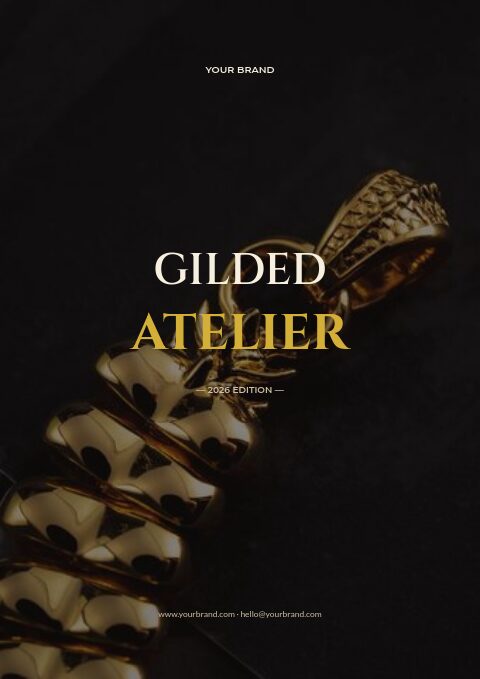
This jewelry brochure template opens on a full-bleed macro photograph of a gold chain and pendant on black, with Gilded Atelier set in Cinzel capitals and the second word in polished gold. Inside, warm ivory type runs on near-black pages with fine rules and gold table headers, Montserrat headings and Lato body text. It is a compact frame for a jewelry line: seven pages that move from story and contents to terms and an order form.
The contents list necklaces, rings, earrings, bracelets and high jewelry, so the brochure suits gold and statement pieces. Add product pages with photo, SKU, price and description, and keep them dark to match. Print it on heavy stock for boutique visits, or send a password-protected flipbook where buyers order through the built-in form. If dark pages do not fit your brand, recolor the set with one of 12 palettes.
Best for
- Gold and statement jewelry brands selling to boutiques
- High jewelry pieces shown by appointment
- Jewelers who want a short brochure rather than a full catalog
- Buying appointments and trade fairs with a printed order form
- Brands whose product photos are shot on dark backgrounds
Pages worth a closer look
Macro gold photo cover
A close-up of a heavy gold chain and pendant fills the page edge to edge, with the title centered in ivory and gold. Replace it with a macro shot of your own signature piece.
Contents up to high jewelry
Necklaces, rings, earrings, bracelets and high jewelry each have a numbered line and page number. The last chapter gives one-of-a-kind or commissioned pieces a place of their own.
Ordering terms for boutiques
Three short steps cover emailing an order, the opening and reorder minimums, and delivery, claims and payment terms. Add insurance and signature-on-delivery notes for higher-value shipments.
Order form in ivory and gold on black
The dark order form keeps company, contact, PO number and ship-to fields, a gold header row over item lines with quantity, unit price and total, and space for subtotal and shipping. Buyers can also order the same pieces in the flipbook.
How to make a jewelry brochure for boutique buyers
Lead with one hero image
A brochure has only a few pages to make an impression. Open with one macro image of your signature piece rather than a collage, shot on black or deep gray with soft light, and save the full range for the product pages.
Group the range into price bands
Boutique buyers plan around price points. Within each chapter, order pieces from entry level to statement, or add small price-band headings, so a store can build an assortment that spans gifts, everyday pieces and one or two showstoppers.
State gold content and finish precisely
Write the karat, whether a piece is solid, vermeil or plated, the plating thickness where you know it, and the gram weight of heavier chains. Trade buyers compare these numbers between suppliers, and their customers will ask about them.
Mark appointment-only pieces
High jewelry and one-off pieces are often shown by appointment or sold on request. Mark them in the brochure, give a contact for viewings and say how pieces travel insured, so buyers know how to take the conversation further.
Print on paper that suits dark pages
Dark pages with fine gold-colored lines print well on heavy coated paper. Export the PDF at 300 DPI with the CMYK option, add bleed and ask for a printed proof, since dark tones can shift between screen and press.
From product list to finished catalog
Start with this set
Open Gilded Atelier in EasyCatalog and recolor it with one of 12 palettes if you like.
Add your products
Import from Shopify in one click, or upload a CSV, connect WooCommerce or a product feed. Your products fill the product pages automatically.
Download or share
Export a print-ready PDF (up to 300 DPI, CMYK and bleed for print shops) or share an online flipbook with a built-in order form.
Questions about this template
How is the Gilded Atelier brochure structured?
Seven dark pages make up the set: the gold photo cover, a welcome letter, contents from necklaces to high jewelry, ordering terms, a chapter divider, an order form with a gold header row and a closing page for your contact details. Your product pages slot in between the divider and the order form.
Will the brochure work for shoppers as well as trade buyers?
Yes. For shoppers, delete the order form and trade terms, then publish it as a showcase flipbook to present the pieces, or as a retail flipbook if you sell through Shopify. Each flipbook link comes with a QR code you can print on packaging or a counter card.
When is a brochure better than a full jewelry catalog?
A brochure is short and selective: a cover, a story, a few hero pieces and how to order. A catalog lists the full range with every SKU and price. Many jewelers send a brochure to open the conversation, then the full catalog or line sheet once a buyer is interested.
How should gold jewelry be photographed for a dark brochure?
Shoot on black or deep gray with soft, diffused light so gold reads warm without harsh reflections, and use a macro lens for clasps, links and settings. Keep the same angle and background across the range, and leave space around each piece for cropping into grids.


Start your Gilded Atelier catalog
Pick this template, add your products and download a print-ready PDF or share an online flipbook. Free plan available, no card needed.