Jewelry lookbook template with a black-and-gold magazine look
A complete, magazine-style jewelry lookbook on black pages with gold detail, for fine jewelers selling to private clients and trade buyers, from solitaires and hoops to bridal sets.
Free plan available — all templates are included on every plan. Already have an account? Open it in Templates.


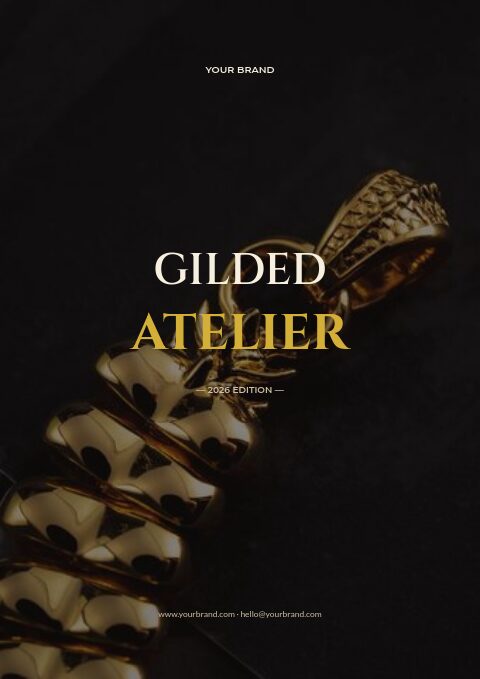
All 27 pages: 7 covers and 20 designed pages
Choose one cover and any of the designed pages — they share one look, so the catalog stays consistent however many you use. Every word, color and photo is editable.


Product pages that fill themselves
Import your products and they take this layout automatically — shown here with sample products. Switch the grid any time, from 2 × 2 to 4 × 5 or a one-column line sheet.


About the Jewelry & Accessories template
This jewelry lookbook template is set like a night-time magazine: near-black pages, warm ivory type and gold hairlines with small tick marks, circular portrait frames and roman-numeral chapters. Cinzel capitals spell the wordmark, EB Garamond carries the serif headings and Muli keeps captions light. Real photography of rings, earrings and necklaces runs through all seven covers and twenty designed pages, and the kit adds a designed product page with mosaic layouts.
The sample copy follows a fine jeweler with an atelier and trade accounts, so the pages serve both audiences: a private-sale invitation and a gift guide for clients, plus ordering steps, deposits and hallmark terms for stores. Your products land on designed product pages with photo, reference number, name and price. Export a CMYK print-ready PDF with bleed for the dark full-bleed pages, or share a flipbook for appointments and private viewings.
Best for
- Fine jewelers with bridal, diamond and gold collections
- Jewelry ateliers presenting a new collection to stockists
- Private client evenings, viewings and invitation-only sales
- Holiday gift guides sorted by price and recipient
- Brands that want a dark, magazine-style catalog with real photography
Pages worth a closer look
Solitaire feature with full specs
Callouts point to the setting, the stone and the band of a featured solitaire, above a spec row for metal, stone, clarity and color grade and ring sizes in half steps, plus two pairs-well-with suggestions.
Gift guide sticker cover
A playful gift-guide cover scatters price stickers across the page, with tabs for her, for him and just because, plus an under $500 badge. It turns the same lookbook into a holiday or Valentine's edition.
Ring size guide with a printable sizer
A table converts US, UK and EU ring sizes with inner diameters in millimeters, and two rows of circles print at 100% as a ring sizer. Below, a diagram of necklace lengths shows where a 16 to 24 inch chain falls.
Private viewing invitation
An invitation page for an evening viewing lists the date, time, address and RSVP, with a line about champagne, a first look at a new pearl collection and engraving at the bench on the night.
Trade terms for stores
Roman-numbered terms explain trade pricing excluding VAT and shipping, gold-priced pieces fixed on the day of order, a 30% deposit to reserve stones and bench time, and independent hallmarking.
How to style a jewelry lookbook for high-value pieces
Shoot sets, not single pieces
Clients buy stacks and pairings: a band with a solitaire, two hoops with a chain. Style lookbook pages as sets, caption every piece in the photo with its name and price, and repeat those pieces on a product page right after the look.
Grade stones in the same order every time
For diamond and gemstone pieces, list carat weight, color, clarity and cut in a fixed order, and say whether each stone is natural or lab-grown. Consistent specs let clients and store staff compare two rings without calling you.
Design dark pages for print
Black pages look rich on screen but need care in print. Export with the CMYK Print professional option, add bleed so the black runs to the edge, keep light body text above about 9 pt and ask your printer for a proof before a full run.
Send invitations early
Private views and trunk shows sell high-value pieces. Send the invitation page three to four weeks ahead with an RSVP date, then follow up with the flipbook link so guests can shortlist pieces before the evening.
Write down trade terms on gold prices
When gold moves, trade prices move with it. Say whether prices are fixed on the order date, how large the deposit is, when the balance is due and how pieces are hallmarked and insured in transit. Stores order with more confidence when the rules are in writing.
From product list to finished catalog
Pick this template
Open Jewelry & Accessories in EasyCatalog and choose the cover and the pages you want — every page is optional and editable.
Add your products
Import from Shopify in one click, or upload a CSV, connect WooCommerce or a product feed. Your products fill the product pages automatically.
Download or share
Export a print-ready PDF (up to 300 DPI, CMYK and bleed for print shops) or share an online flipbook with a built-in order form.
Questions about this template
Which pages does the black-and-gold jewelry kit include?
The kit pairs seven covers, a gift-guide sticker cover among them, with twenty photographed pages and a designed product page with mosaic layouts. Its inside pages are welcome, contents, collection divider, lookbook, featured solitaire, story, team, trade ordering, best sellers, private sale, figures, a private viewing invite, reviews, FAQ, size guide, care, contact, terms, a blank page and a back cover.
Can I make a lighter version of this black jewelry lookbook?
Yes. Colors, fonts and photos are all editable, so you can switch the black pages to ivory or white and recolor the gold accents. Use Replace photo on any picture to add your own pieces, or search the free stock photos inside the editor.
What should a fine jewelry lookbook include for trade buyers?
Collection stories with styled photos, then every piece with its reference number, metal, stone details, sizes, trade and suggested retail price. Add ordering steps, deposit and payment terms, lead times for made-to-order pieces and a contact for samples. A password-protected flipbook keeps trade prices away from the public.
When should a jeweler send a holiday gift catalog?
Plan for it to reach clients by early November, since many shoppers buy jewelry gifts weeks before the holidays and engraving or resizing needs time. Print clear order-by dates, then send a shorter Valentine's edition in mid-January using the same pages with a new cover.



Start your Jewelry & Accessories catalog
Pick this template, add your products and download a print-ready PDF or share an online flipbook. Free plan available, no card needed.