A catalog order form template for orders by hand or online
A violet-and-indigo catalog that doubles as a purchase form: buyer details on the cover, an order sheet with totals inside, and SKU, case pack and wholesale price on every product. The sample brand, a wooden toy workshop, is fictional.
Free plan available — all templates are included on every plan. Already have an account? Open it in Templates.


All 17 designed pages
Covers, promotion and product-story pages built for this campaign. Use the ones you need; your product pages are added in the same style.




Product pages that fill themselves
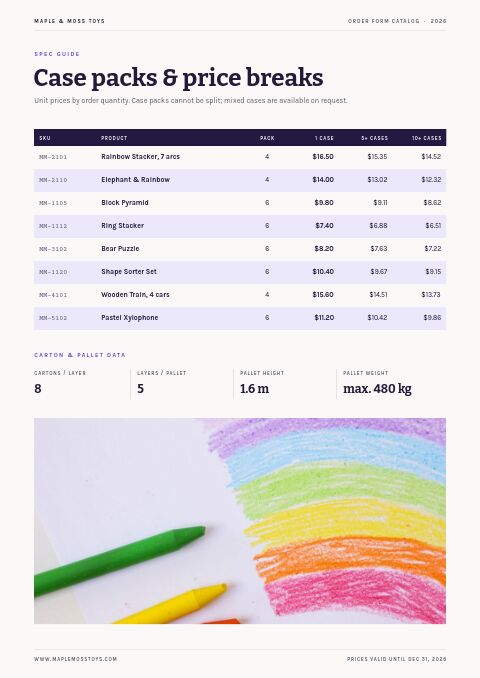
Import your products and they take this layout automatically — shown here with sample products. Switch the grid any time, from 2 × 2 to 4 × 5 or a one-column line sheet.

About the Order Form Catalog template
Most catalogs keep every ordering detail at the back; this catalog order form template puts the buyer's details on the cover. Under the title, a ruled Buyer Details box asks for store name, account number, PO number, ship-to address and requested ship date, with checkboxes for payment and shipping method. Bitter slab-serif headlines, Karla text and Courier Prime form codes give it a crisp stationery feel in deep indigo and violet, with a photo of a boxed wooden rainbow beside the title.
Made for buyers who still like to write orders down, at trade shows, in showroom visits or after a sales call. Enter products by hand or bring them in from Shopify or a CSV; each one prints with its SKU, case pack and price, so buyers can copy codes straight onto the order sheet. The same catalog can be shared as a wholesale flipbook with a built-in order form for buyers who would rather order online, and those orders reach you by email and in the app.
Best for
- Toy, gift and stationery makers selling to independent shops
- Suppliers taking written orders at trade shows and showrooms
- Brands whose buyers order twice a year from a printed catalog
- Museum, bookstore and gift-shop suppliers with case-pack pricing
- Sales reps collecting signed order forms on the road
Pages worth a closer look
Buyer details on the front cover
The cover carries a printed form with store name, account number, buyer, PO number, email, phone, ship-to and requested ship date, plus checkboxes for payment terms and shipping method. Buyers fill it in first, so orders arrive complete.
Order sheet with totals and signature
Three short steps sit above an order table with columns for SKU, description, color or size, quantity, unit price and line total, followed by subtotal, freight, total and an authorized signature line. Print extra copies to hand out at trade shows.
Two-season ordering
A promotion page rewards buyers who place spring and holiday orders together, with discount steps, a combined minimum and a ship date for the holiday half. It is a simple way to secure the second half of the year early.
A featured product with price breaks
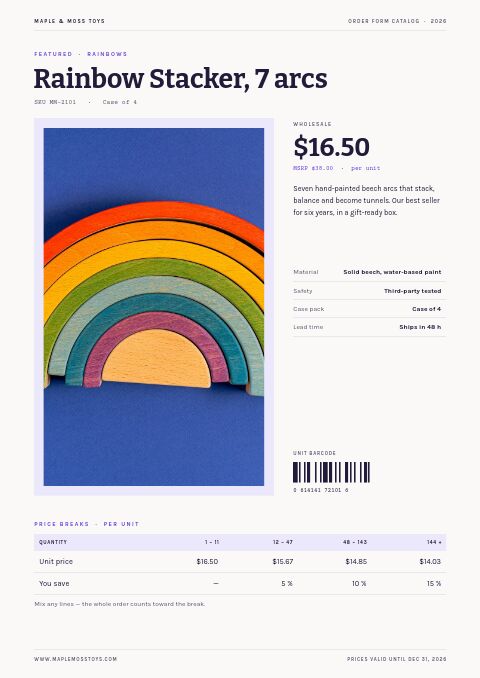
One product gets a large photo, wholesale price against MSRP, materials, a safety-testing note, case pack, lead time, a unit barcode and a price-break table, so buyers see the reward for ordering more before they fill in the form.
How to design an order form buyers fill in correctly
Ask for everything you need to ship
Missing details slow every order. Ask for store name, account number, buyer, PO number, ship-to address, requested ship date, payment method and shipping method, and leave room for notes. A small please-print label near handwritten fields keeps them legible.
Match the form to the catalog
List products on the form in the same order and with the same SKUs as the catalog pages, and repeat case packs so buyers order in whole cases. A column for color or size prevents mix-ups on items that come in several variants.
Make totals easy to check
Include unit price, line total, subtotal, freight and grand total, and say how freight is calculated. Print the minimum order on the form itself so undersized orders are caught before they are sent, and leave space for a signature and date.
Number and date your forms
Give each form a code and edition, such as a year and letter, and print the date until which its prices are valid. When an old form comes back months later, your team can see at once which prices apply.
Offer an online twin
Some buyers prefer paper; others want to order from a phone late at night. Offer both: a printed form and a link or QR code to the same catalog online, with matching SKUs, so every order looks the same to you whichever route a buyer takes.
From product list to finished catalog
Pick this template
Open Order Form Catalog in EasyCatalog and choose the cover and the pages you want — every page is optional and editable.
Add your products
Import from Shopify in one click, or upload a CSV, connect WooCommerce or a product feed. Your products fill the product pages automatically.
Download or share
Export a print-ready PDF (up to 300 DPI, CMYK and bleed for print shops) or share an online flipbook with a built-in order form.
Questions about this template
Can buyers fill in the order form digitally?
The printed form is designed to be filled in by hand. For digital orders, share the catalog as a wholesale flipbook: its built-in order form lets buyers choose quantities for each product, applies your minimum order and quantity rules, and sends the order to you by email and in the app.
Can I change the fields on the buyer details form?
Yes. The labels, lines and checkboxes are editable, so you can rename fields, swap a payment option or delete what you do not need, then change colors and fonts to suit your brand. The order table on the how-to-order page can be relabeled in the same way.
Why do some buyers still prefer paper order forms?
At trade shows and sales visits, a paper form is quick, needs no login and leaves a signed record of what was agreed. Many small shop owners also plan orders on paper with the catalog open beside them. Offering both paper and online ordering covers every buyer.
How often do toy and gift shops place wholesale orders?
Many independent toy and gift shops place a larger order in late winter or spring and another in summer for the holiday season, with smaller reorders in between. That is why two-season programs, and reorder minimums lower than the opening minimum, are common in the category.
More templates like this


Start your Order Form Catalog
Pick this template, add your products and download a print-ready PDF or share an online flipbook. Free plan available, no card needed.