Promotional products order form that matches your swag catalog
Made for promotional products sellers, this 7-page set pairs a bright cover, contents and how-to-order terms with a wholesale order form that has PO number and ship-to fields. Your mugs, tees and totes fill the pages between.
Free plan available — all templates are included on every plan. Already have an account? Open it in Templates.


All 7 pages, in two versions
Cover, welcome letter, contents, how-to-order terms, a section divider, a wholesale order form and a back cover. Your product pages are added between them in the same fonts and colors.




About the Promotional Products template
The promotional products order form here comes inside a seven-page set with a playful, rounded look: cover, welcome letter, contents, how to order, divider, order form and back page. Comfortaa spells PROMO PRODUCTS across the cover, and a violet quarter circle, a yellow diamond, a teal dot and a pink base rule bring color to white pages, with Nunito for smaller text. A photo version stacks three desk snapshots on the cover, puts two photos atop the divider and closes on a full-bleed shot of mugs and highlighters; 12 palettes recolor the set.
Your products are added after the divider on grid pages, from 2 × 2 for hero items to 4 × 5 for pens and keychains, or as one-column line-sheet rows. The printed form gives buyers company, PO number, ship-to, SKU, quantity and unit price columns, while the wholesale flipbook adds a built-in order form with minimum quantities. It suits resellers handing a swag menu to office managers, HR teams and event planners.
Best for
- Promo distributors sending a branded swag menu to office and HR buyers
- Small decorators who take orders by email and need a printable order form
- Company stores collecting merch requests from teams and departments
- School, club and nonprofit merch drives that need a simple order sheet
- Event agencies pre-selling giveaways for conferences and trade shows
Pages worth a closer look
Wholesale order form with PO number
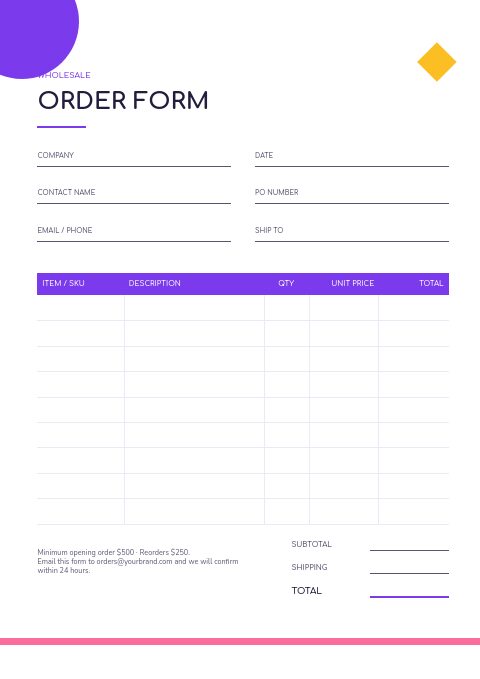
A full-page form asks for company, contact, date, PO number, email or phone and ship-to address, then lists item or SKU, description, quantity, unit price and total, with subtotal and shipping lines. Buyers can print it, fill it in and email it back.
Contents built around five merch ranges
Drinkware, apparel, bags and totes, tech and gadgets, and an eco range are already listed with page numbers, which mirrors how promo buyers browse. Rename the ranges and edit the numbers so the page matches your own lineup.
How-to-order page with minimums
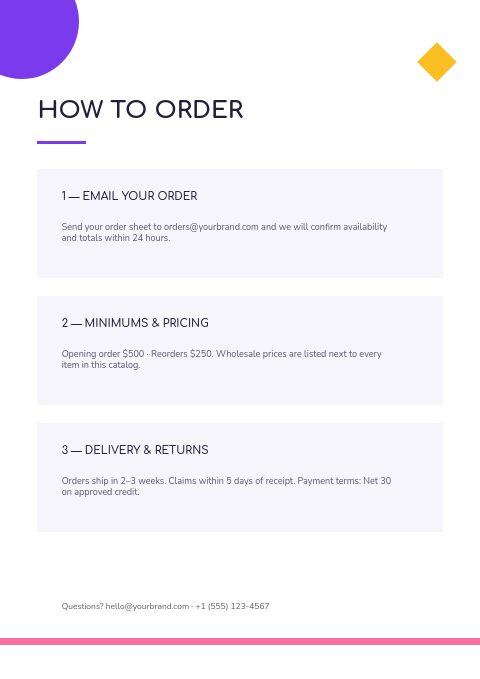
The how-to-order page explains ordering by email, the opening and reorder minimums and delivery terms. Swap the sample $500 and $250 figures for your per-item minimums, and add screen or digitizing fees so merch buyers see the full cost.
Bright, rounded cover
PROMO PRODUCTS is set large in rounded Comfortaa letters beside a violet quarter circle, a yellow diamond and a teal dot. The photo-collage version stacks three tilted snapshots above the title, ready for your own product shots.
How to set up an order form for promotional products
Ask for the in-hands date
Promo orders are planned backward from an event, so ask when the goods must arrive, not only when the order was placed. Rename one field or add a line for the in-hands date next to ship-to, and you can flag rush charges before production rather than after a missed launch.
Capture imprint details on every line
A promo order line is incomplete without decoration details. Use the description column, or a note under the table, for imprint location, decoration method and ink or thread colors, ideally as color codes from the client's brand guide, so your art team can proof without another email.
Break apparel down by size
Tees, hoodies and polos need a size run, not a single quantity. List each size as its own row or SKU, and state any upcharge for 2XL and larger, so the form total matches the invoice the buyer receives later.
Put minimums next to the quantity column
Print the minimum per item and any screen or digitizing charges on the how-to-order page, then repeat them under the form. Small buyers often order below the minimum by accident, and seeing the rule beside the quantity box saves a round of corrections.
Request vector artwork with the order
Add a line asking buyers to attach their logo as a vector file with outlined fonts. Blurry logos copied from a website are a frequent reason a promo order stalls at the proof stage, and asking up front protects your production slot.
From product list to finished catalog
Start with this set
Open Promotional Products in EasyCatalog, in the clean or the photo version, and recolor it with one of 12 palettes if you like.
Add your products
Import from Shopify in one click, or upload a CSV, connect WooCommerce or a product feed. Your products fill the product pages automatically.
Download or share
Export a print-ready PDF (up to 300 DPI, CMYK and bleed for print shops) or share an online flipbook with a built-in order form.
Questions about this template
What pages are in the Promotional Products set?
Seven pages: a cover, a welcome letter, contents, how to order with minimums, a collection divider, a wholesale order form and a back page. In the photo variant the cover stacks three snapshots, the divider gets a band of two photos and the back page one full-bleed photo, while the other four stay the same. Products are added between them on grid or line-sheet pages.
Is the Promotional Products set free to use?
Yes. Every template, this one included, is part of all plans, and the Free plan asks for no card. What Free limits is the number of catalogs: two for a Shopify store (one built with the grid editor, one with the Basic editor) or a single five-page catalog for an account without Shopify, each carrying a small watermark. When you outgrow Free, Basic is the first paid step at $19.99 a month.
What should a promotional products order form ask for?
Besides company, contact, PO number and ship-to, a promo form needs the item number, product color, quantity per size for apparel, imprint location, decoration method, ink or thread colors and the in-hands date. Leave space for artwork notes and proof approval so production can start without follow-up calls.
What minimum order quantities are typical for promotional products?
Minimums vary by item and method. Decorated apparel and bags often start around 12 to 25 pieces, while pens and other small items often start at 100 to 250, because setup is spread across the run. State the minimum for each item in your catalog and explain any small-order fee.
More templates like this


Start your Promotional Products catalog
Pick this template, add your products and download a print-ready PDF or share an online flipbook. Free plan available, no card needed.